



CUDY Lebanon — WiFi Routers, Mesh Systems and Access Points

SONOFF DR DIN Rail Tray
Sonoff DR helps adding Sonoff smart relay products to any DIN-rail electrical cabinets.
$4.00SONOFF DR DIN Rail Tray
$4.00
SONOFF RL560 5M Sensor Extension Cable
5 meter long extension cable for new THS01 Temperature & Humidity Sensor, WST01 waterproof Temperature sensor, and MS01 Soil Moisture Sensor, with RJ9 in and out connectors.
Cable Length: 5 meters (5M)
Connector: RJ9 4P4C
Conductor Resistance: Max. 10Ω
Insulation Resistance: Min. 5MΩ
Maximum Extendable Length
Up to 60 meters for THS01 and DS18B20 sensors
Up to 10 meters for MS01 soil moisture sensors
$5.00
SONOFF DC 5V/2A Adapter
A standard 5V DC USB standard power adapter with 2A output from the smart home manufacturer. You may use it to power 5V USB Sonoff smart home devices or any other products.
Input Voltage: AC 100-240V
Output Voltage: DC 5V
Output Current: 2A (maximum)
Material: Fire-retardant PC plastic (V-0 level)
Operating Temperature: -10°C to 45°C$5.00SONOFF DC 5V/2A Adapter
$5.00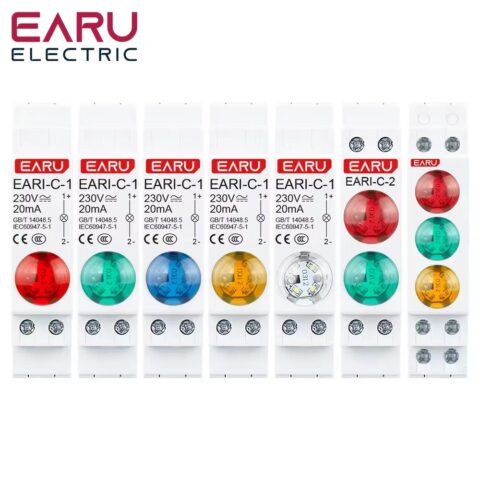
EARU LED Signal Dual Color
LED Color: Red, Green
Connector Type: Wire
IP Level: IP20
Voltage: AC 220V
Installation method: DIN-Rail Mounting
Material: Plastic$5.00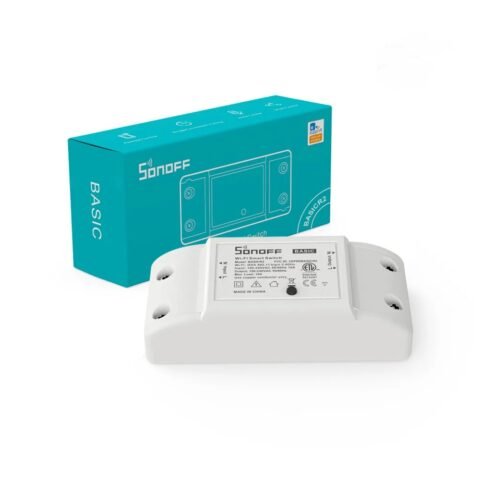
SONOFF Basic R2 WiFi Wireless Smart Switch
Sonoff’s entry level smart relay, remotely controllable via Internet and smartphone, WiFi equipped, with timer function, 2200W (10A) peak output.
Mobile Phone APP support: ewelink
Input Voltage: 100-240V AC
Max. Load: 10A / 2200W
Gang: 1-gang (single channel)
Working Temperature: -10°C to 40°C
Working Humidity: 5-95% RH, non-condensing
Wireless connectivity: WiFi IEEE 802.11 b/g/n 2.4GHz$6.00
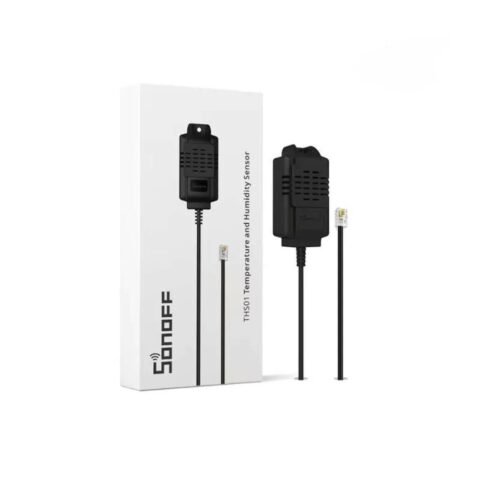
SONOFF Temp and Humidity Sensor THS01
Sonoff THS01, an upgraded version of Si7021 sensor is a high accuracy. combined temperature and humidity sensor, compatible with Sonoff TH R3 Origin and Sonoff TH R3 Elite relays, equipped with RJ9 4P4C connector.
Mobile Phone APP support: ewelink
Temperature Range: -40°C to +85°C
Humidity Range: 0% to 100% RH
Connector Type: RJ9 4P4C
Cable Length: 50 cm$6.00
SONOFF NFC Tag
Use this Sonoff NFC chip in your eWeLink smart home system. The chip is integrated to an 18mm sticker, put on a plastic card.
You may use it as a portable card, or stick it to the wall or any other place as a sticker.
Mobile Phone APP support: ewelink
Quantity: 2 pcs NFC tag/pack
Capacity: 540 bytes
Size: 18mm diameter$6.00SONOFF NFC Tag
$6.00
SONOFF DW2 RF Wireless Door / Window Sensor
Sonoff DW2 RF is the successor of the phased out DW1 RF door/window sensor, compatible with Sonoff’s smart home product line. It can detect and trigger on open event and send alerts to an RF Bridge or directly to a smart relay switch or wall switch with RF receiver.
Note: DW2 RF needs to be used with RF Hub.
Mobile Phone APP support: ewelink
Wireless Transmission distance: Max. 50m
Working Voltage: DC 3V (2×1.5V AAA)$6.00
SONOFF Waterproof Temperature Sensor WTS01
Outdoor and indoor waterproof temperature sensor compatible with Sonoff TH Origin and TH Elite.
Mobile Phone APP support: ewelink
Cable Length: 1.5 meters (150 cm)
Connector: RJ9 (4P4C)
Working Temperature Range: -40°C to +115°C
Accuracy: ±0.5°C within the range of -10°C to 85°C
Probe: Stainless steel, waterproof, corrosion-resistant$6.00
SONOFF DW2 WiFi Wireless Door / Window Sensor
WiFi version of Sonoff’s door/window sensor, fully compatible with Sonoff’s smart home product line. It connects to the WiFi router directly,
Mobile Phone APP support: ewelink
Working Voltage: DC 3V (2×1.5V AAA)
Working temperature: -10°C+40°C
Working Humidity: 5-95% RH, non-condensing
Wireless connectivity: WiFi IEEE 802.11 b/g/n 2.4GHz$7.00
SONOFF MINIR2 Two Way Smart Switch
Sonoff’s smallest WiFi smart relay, used to add smart control to an existing 1-gang wall switch or power socket. Can be installed behind traditional wall switches and power sockets. In DIY mode supports integration with other smart home systems via REST API.
Mobile Phone APP support: ewelink
Input / Output Voltage: 100-240V AC
Connectivity: WiFi 2.4 GHz b/g/n$7.00

Which CUDY do you need?
If you just need a better router
- CUDY AC1200 (GP1200) — $16. 867 Mbps on 5 GHz, 300 Mbps on 2.4 GHz, 1.15 GHz dual-core CPU with 256 MB RAM, coverage up to 170 m. At this price it is the obvious replacement for the box your ISP supplied.
- CUDY AC1200 Gigabit Mesh Router (WR1300) — $22. Same speeds, plus Gigabit ports and mesh support so you can add units later instead of starting over.
- CUDY AX3000 WiFi 6 (WR3000) — $30. 2402 Mbps on 5 GHz and 574 Mbps on 2.4 GHz, 1.3 GHz dual-core ARM Cortex-A53, 256 MB DDR3, up to 200 m, mesh-ready. This is the value pick of the whole range — WiFi 6 for $30.
If you have dead zones — mesh
Lebanese flats and village houses are built in concrete and stone, often long and narrow, often across more than one level. One router in the corner by the ISP socket will never cover that. Mesh puts several units on the same network name so your phone moves between them without dropping.
- AC1200 Whole Home Mesh, 2 pack (M1300) — $45. 867 + 300 Mbps, Gigabit ports. Configure one unit and the second syncs itself. 6 reviews at 5.0.
- AX1500 WiFi 6 Mesh, 1 pack (M1500) — $34. Add a single node to an existing AX1500 mesh, or start small.
- AX1500 WiFi 6 Mesh, 3 pack — $90. 1201 + 300 Mbps, up to 230 m² (2500 sq ft). For a large flat or a house.
- BE3600 WiFi 7 Mesh, 3 pack (M3600) — $135. WiFi 7: 2882 Mbps on 5 GHz plus 688 Mbps on 2.4 GHz, 3.6 Gbps aggregate, 2.0 GHz quad-core CPU, 512 MB DDR3L, three Gigabit ports, up to 270 m² (2900 sq ft). The top of our range.
- BE3600 WiFi 7 Mesh, 2 pack — $94. Currently out of stock — ask us when it is due.
If you need to cover a shop, an office or outdoors — access points
- AC1200 Ceiling Mount Access Point (AP1300) — $36. 867 + 300 Mbps, up to 170 m, PoE so one cable carries data and power. Spreading WiFi down from the ceiling covers a shop or classroom far more evenly than a router pushing sideways from a corner.
- AC1200 Outdoor Access Point — $55.
- AX3000 High Power WiFi 6 Outdoor Access Point (AP3000) — $65. 2402 + 574 Mbps, IP65 weatherproof, PoE, pole or wall mount, range up to 320 m. Built for a garden, a yard, a farm, a car park, a rooftop or a second building on the same plot — the classic Lebanese "get WiFi to the other house / the shop downstairs" problem.
Why this matters in Lebanon
Here is the part nobody selling routers mentions. Your smart home is only as reliable as your WiFi, and in Lebanon your WiFi restarts several times a day. Every time EDL hands over to the moteur, the router reboots — and then every WiFi device in the house tries to reconnect at the same moment. On a weak router with a small CPU and little RAM, that pile-up is exactly why your lights take two minutes to answer after the power comes back.
This is why CPU and RAM on the spec sheet are not marketing noise: the AX3000's 1.3 GHz dual-core with 256 MB, or the BE3600's 2.0 GHz quad-core with 512 MB, handle a mass reconnection far more gracefully than the ISP box.
Three practical recommendations for a Lebanese setup:
- Put the router on a small UPS. It draws very little — DC 12V 1A on most of these units — so even a modest UPS keeps your internet and your smart home alive across the changeover. This is the single cheapest improvement most homes can make.
- Keep a working 2.4 GHz band. Every smart-home device — Sonoff, Tuya, eWeLink, Imou — pairs on 2.4 GHz only. A router that lets you name the 2.4 GHz band separately makes setup painless. Ask us and we will show you where that setting lives.
- If you have more than about fifteen smart devices, move the sensors to Zigbee and let the WiFi carry phones, laptops and TV. See the Sonoff Zigbee range.
Buying CUDY from AHS
- Genuine CUDY with AHS warranty and local support. Ask us for the coverage period on a specific model.
- Honest sizing advice. Tell us your flat's size and layout on WhatsApp at +961 81 009 594 and we will tell you whether you need a mesh at all — very often a single AX3000 in the right place beats a three-pack in the wrong ones, and it costs you a third as much.
- One-stop range. Router, mesh, access point, plus the smart-home devices that depend on them, all from one supplier — see the full Networks category.
- Delivery: same or next day in Beirut and Mount Lebanon, 1–3 business days elsewhere in Lebanon. Flat $4–$5 by area.
- Pay on delivery — cash, OMT or Whish.
- 3-day returns, unused in sealed original packaging, dropped off at our shop at Bldg 4, Unesco, Beirut, return courier at your cost.
CUDY FAQs
Is CUDY a good brand?
For the money, yes — and we would say so plainly if it were not, because we are the ones who handle the warranty. CUDY has been building networking hardware since 2018 and its routers, mesh systems and access points offer specifications, CPU and RAM well above what the same price buys from the better-known names. We stock it because it is what we would put in our own homes at that budget.
Do I need WiFi 6 or WiFi 7?
Be honest about your internet speed first. If your line is 10–50 Mbps, WiFi 6 or 7 will not make your internet faster — but it will make a busy house behave better, because the newer standards handle many devices at once far more efficiently. With a family of four, a few TVs and twenty smart devices, WiFi 6 (AX3000, $30) is worth it. WiFi 7 (BE3600) is for large homes and people who want to buy once and be done.
Will a CUDY router work with my ISP in Lebanon?
Yes. These are standard routers and work with Ogero and private ISP connections. Depending on your line type you may keep the ISP's modem and put the CUDY behind it in router mode, or replace the box entirely. Tell us your provider and connection type on WhatsApp and we will tell you exactly which setup you need before you buy.
How many mesh units do I need?
As a rough guide: a normal Lebanese flat is usually fine with a good single router or a 2-pack; a large flat or a house on two levels wants a 3-pack. Concrete and stone walls matter more than square metres, so send us the layout and we will give you a straight answer rather than upselling you.
Can I use CUDY mesh with my existing router?
Yes. You can run CUDY mesh units in access-point mode behind an existing router, which is the usual approach when your ISP box has to stay in place. Ask us and we will explain the setup for your specific situation.
What is PoE and do I need it?
PoE — Power over Ethernet — sends data and power down one network cable, so a ceiling or outdoor access point needs no socket where it is mounted. If you are mounting an AP on a ceiling, an outside wall or a pole, PoE is what makes the install tidy and possible.
Will a CUDY router help my smart-home devices reconnect faster after a power cut?
Yes, noticeably. A router with a stronger CPU and more RAM handles the moment when twenty devices all reconnect at once far better than a basic box. The bigger win, though, is putting the router on a small UPS so it never reboots at the changeover in the first place.
Do CUDY routers support 2.4 GHz for smart-home devices?
Yes — every model we stock is dual-band, with a full 2.4 GHz network for Sonoff, Tuya, eWeLink and Imou devices, plus 5 GHz for phones, laptops and streaming.
CUDY makes the WiFi hardware that punches above its price — and AHS stocks the range in
Lebanon, from a $16 dual-band router to a $135 three-unit WiFi 7 mesh system. Genuine
products with AHS warranty and local support, delivered anywhere in Lebanon, payable on delivery in
cash, OMT or Whish.
Founded in 2018, CUDY builds routers, mesh systems, access points, PoE gear and outdoor
networking equipment. We stock it for a simple reason: the specifications you get per dollar are
better than the household names, and in a market where people are careful with money that matters
more than a badge.